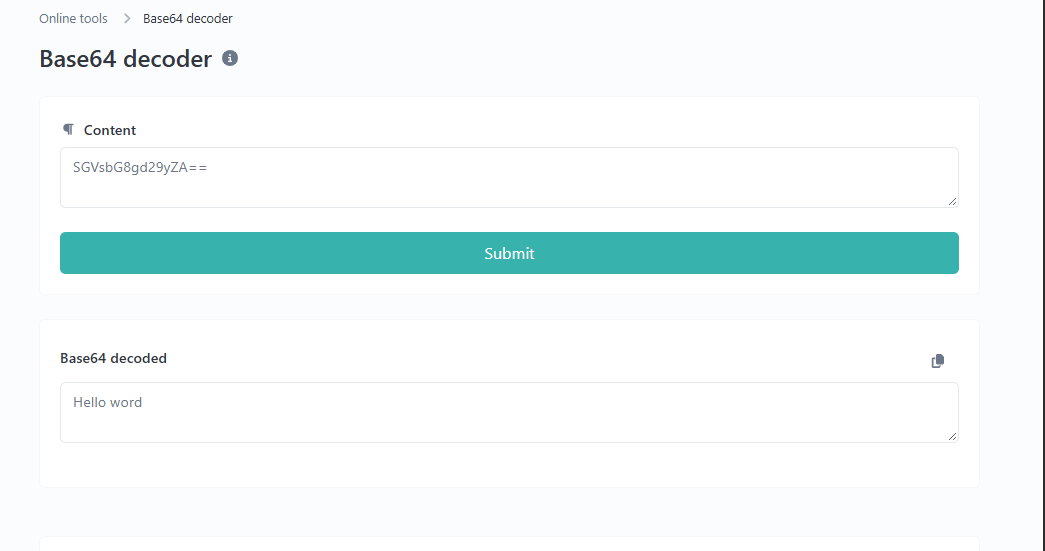
Base64 Decoder: Decode Base64 Text Online Easily
Created on 5 October, 2026 • Converter Tools • 44 views • 5 minutes read
A Base64 Decoder is an online tool that converts Base64-encoded data back into its original bytes. When the decoded data represents ordinary text, you can read the original message directly. Base64 decoding is useful for web developers, programmers, students, and anyone who needs to inspect encoded text from APIs, configuration files, or web applications.The URLShorta Base64 Decoder helps users decode supported Base64 strings online without manually converting individual characters.
What Is Base64 Decoding?
Base64 decoding is the reverse process of Base64 encoding. Base64 represents data using a set of characters that can be handled by many text-based systems. The standard Base64 character set contains uppercase letters, lowercase letters, numbers, plus signs, and forward slashes. An equals sign may appear at the end as padding.
For example, the word `Hello` can be represented in Base64 as `SGVsbG8=`. Decoding this value returns the original text:
**Encoded text:** `SGVsbG8=`
**Decoded result:** `Hello`
Base64 is an encoding format, not an encryption method. It does not protect information from anyone who can access the encoded value.
How to Use the URLShorta Base64 Decoder
Step 1: Open the Decoder Tool
Visit the Base64 Decoder tool on URLShorta to access the online decoding interface.
Step 2: Enter Your Base64 Text
Copy a Base64 string from your source and paste it into the input field.
For example:
`V2VsY29tZSB0byBVUkxTaG9ydGEh`
Step 3: Decode the String
Use the tool's decode function to process the input. The result should contain the decoded data in the format supported by the tool.
Step 4: Check the Result
For the example above, the decoded text is:
`Welcome to URLShorta!`
If the result is unreadable, the decoded bytes may represent binary data instead of ordinary text. The input may also be incomplete or incorrectly formatted.
Practical Base64 Decoder Examples
Example 1: Decode a Simple Message
Base64 input:
`SGVsbG8gV29ybGQ=`
Decoded result:
`Hello World`
This example shows how a readable message can be converted into Base64 and then restored through decoding.
Example 2: Decode JSON Data
Base64 input:
`eyJuYW1lIjoiQW5uIiwicm9sZSI6ImRldmVsb3BlciJ9`
Decoded result:
`{"name":"Ann","role":"developer"}`
Developers may encounter encoded JSON while testing an API or troubleshooting an application. Once decoded, the text can be reviewed or formatted using a JSON tool.
Example 3: Inspect Encoded Application Data
Some applications use Base64 to represent text or binary data in API responses, configuration values, and data URLs. Decoding a supported value can help developers understand its contents during testing.
However, Base64 data does not always represent plain text. Images, compressed content, and other binary formats may require additional tools to interpret correctly.
Common Uses of a Base64 Decoder
Web Development and API Testing
Developers can use a decoder to inspect Base64 strings returned by APIs or used in web applications. It can help identify readable text and examine data during development.
Data URL Inspection
Some data URLs contain Base64-encoded image or file data. Decoding the Base64 portion produces the underlying bytes, but viewing the result may require an appropriate application.
Learning About Data Encoding
Students and beginners can use Base64 examples to understand how information can be represented in different formats. Testing simple strings is a practical way to learn the difference between encoded data and readable text.
Base64 Encoding Is Not Encryption
Base64 is designed to represent data, not to keep it secret. Anyone with a compatible decoder can reverse the encoding without a password or secret key.
Do not rely on Base64 to protect passwords, API keys, private messages, or confidential information. Use appropriate encryption and security controls when sensitive data needs protection.
If a Base64 string contains encrypted data, decoding it only recovers the encrypted bytes. It does not decrypt the underlying information.
Common Base64 Decoding Problems
Invalid Characters
Standard Base64 uses a defined character set. Unexpected characters or copied formatting may cause decoding to fail. Some systems use Base64URL, which replaces `+` and `/` with `-` and `_`. Support for this variation depends on the decoder.
Missing Padding
Some Base64 strings omit trailing equals signs. Certain decoders can handle missing padding automatically, while others may require correctly formatted input. Check the format used by the source if an error occurs.
Unreadable Decoded Output
A successful decoding operation does not guarantee readable text. Base64 can represent binary data such as images or other files. Those bytes may need to be saved and opened with compatible software.
Incomplete Input
If a string has been truncated or changed, the decoder may return an error or unexpected results. Compare the input with the original source before troubleshooting further.
Is It Safe to Decode Base64 Online?
The privacy of an online decoder depends on how the website processes and handles submitted data. Before using any online tool with confidential information, review the website's privacy policy and data-handling practices.
Avoid submitting passwords, authentication tokens, private keys, personal records, or other sensitive data to an online decoder unless you have verified that the service is appropriate for that information. For confidential data, consider using a trusted local tool.
Base64 Decoder vs. Base64 Encoder
A Base64 Encoder converts supported data into a Base64 representation. A Base64 Decoder reverses that process and recovers the corresponding bytes.
Use a decoder when you already have a Base64 string and want to inspect its contents. Use an encoder when you need to convert text or supported data into Base64.
You can also visit the URLShorta Base64 Encoder to encode text online.
Frequently Asked Questions
What does a Base64 Decoder do?
A Base64 Decoder converts Base64-encoded data back into its original bytes. If the bytes represent text in a compatible character encoding, the result can be displayed as readable text.
Can Base64 be decoded without a password?
Yes. Base64 is an encoding format rather than password-based encryption. A compatible decoder does not need a secret key to reverse the encoding.
Why is my decoded result unreadable?
The decoded data may represent a binary file rather than plain text. The input may also be incomplete, invalid, or intended for a different character encoding.
Does Base64 protect sensitive information?
No. Base64 does not provide confidentiality. Anyone who obtains the encoded string can decode it. Use suitable encryption to protect sensitive information.
Can I use a Base64 Decoder on my phone?
Yes, you can use an online decoder on a mobile browser if the tool supports your device and browser.
Conclusion
A Base64 Decoder is useful for inspecting encoded strings, testing application data, learning about data formats, and recovering readable text from valid Base64 input. Understanding its limitations helps you interpret results correctly and avoid confusing encoding with encryption.
Try the URLShorta Base64 Decoder to decode supported Base64 strings online. If you need to encode text instead, visit the Base64 Encoder tool.
Categories
Popular posts
-
What Is a Gravatar Checker?Checker-tools • 90 views
-
-
-
-