Base64 Encoder Tool: Convert Text to Base64 Online
Created on 25 September, 2026 • Converter Tools • 67 views • 7 minutes read
Base64 is a widely used encoding method that converts binary data into a text-based representation. It is commonly found in web development, email systems, data exchange, and applications that need to represent information using a limited set of printable characters.A Base64 Encoder can help convert ordinary text into a Base64 string without requiring users to write code or perform the conversion manually. Developers can use it to test data formats, students can learn how encoding works, and website owners can prepare text for compatible applications.
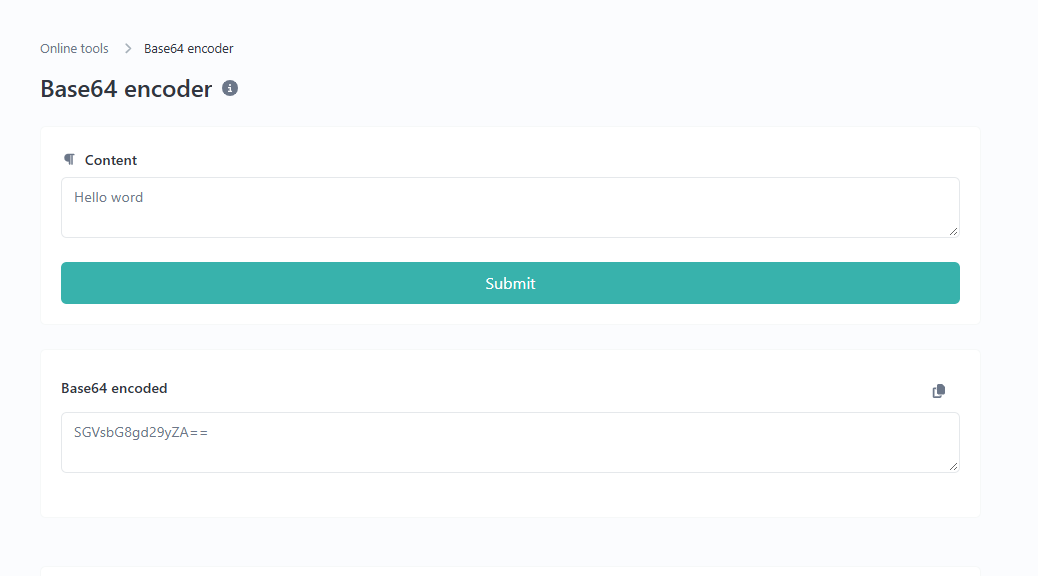
The UrlShorta Base64 Encoder Tool provides an online way to encode text into Base64. This guide explains the encoding process, provides practical examples, and describes important limitations to understand before using the result.
What Is Base64 Encoding?
Base64 is a method of representing binary data as text using 64 primary characters: uppercase letters, lowercase letters, numbers, the plus sign (`+`), and the forward slash (`/`). The standard Base64 format can also use the equals sign (`=`) for padding.
Base64 processes data in groups of three bytes and represents those bytes using four Base64 characters. When the input length is not a multiple of three bytes, padding may be added to complete the final group.
For example, the word `cat` is represented in Base64 as:
`Y2F0`
The original text and the encoded string represent the same underlying data in different formats. Base64 is an encoding method, not a form of encryption.
What Is a Base64 Encoder Tool?
A Base64 Encoder Tool converts supported input into its Base64 representation. Instead of writing a program, users can enter text, run the encoding process, and copy the resulting string.
The tool can be useful for learning about data encoding, preparing test values, and working with systems that expect Base64-formatted data.
Try the UrlShorta Base64 Encoder Tool to encode text online.
The exact input limits and supported options depend on the tool's implementation. Always check the output before using it in another application.
How to Use the UrlShorta Base64 Encoder Tool
Step 1: Prepare Your Text
Choose the text you want to encode. For example:
`Hello World!`
For the most predictable results, use a short test string first.
Step 2: Open the Encoder
Visit the UrlShorta Base64 Encoder Tool in your web browser.
Step 3: Enter Your Input
Type or paste the text into the input field provided by the tool. Make sure the input contains the intended characters and has not been accidentally truncated.
Step 4: Encode the Text
Use the encoding action available on the page. The tool should produce a Base64 string corresponding to the input and the character encoding used by its implementation.
Step 5: Review and Copy the Output
Check the generated string and copy it for your intended use. If the encoded value will be passed to another program or service, confirm that the receiving system expects standard Base64.
Do not use real passwords, secret keys, or other confidential information as test input on an online tool.
Base64 Encoding Examples
The following examples use standard Base64 with UTF-8 text where applicable.
Example 1: Encode a Simple Word
Original text:
`cat`
Base64 output:
`Y2F0`
This example contains three ASCII bytes, so the output does not require padding.
Example 2: Encode a Greeting
Original text:
`Hello World!`
Base64 output:
`SGVsbG8gV29ybGQh`
The space between the words is included in the encoded data.
Example 3: Encode a Website Name
Original text:
`Welcome to urlshorta.com`
Base64 output:
`V2VsY29tZSB0byB1cmxzaG9ydGEuY29t`
This example illustrates how a longer text string can be represented as Base64.
Example 4: Encode a Short String With Padding
Original text:
`Hi`
Base64 output:
`SGk=`
The equals sign is padding used by standard Base64 to complete the final four-character group.
Example 5: Encode Unicode Text
Original text:
`café`
Base64 output using UTF-8:
`Y2Fmw6k=`
Characters outside basic ASCII can use multiple bytes in UTF-8. Consequently, the Base64 output depends on the input's byte representation, not just the number of visible characters.
Why Is Base64 Encoding Used?
Represent Binary Data as Text
Some systems are designed to transport or store text rather than arbitrary binary data. Base64 allows binary information to be represented using a printable character set.
Support Data Exchange
Developers may encounter Base64 in API responses, configuration values, and data-processing workflows. Encoding can help when a particular format expects a Base64 string.
Embed Compatible Data in Web Content
Certain web formats support Base64 representations, including data URLs. However, the required syntax and permitted content depend on the destination format.
Test and Debug Applications
A Base64 Encoder can help developers create sample values and compare expected outputs while testing applications.
Learn About Character Encoding
Using a Base64 tool can help learners understand the difference between text, bytes, and textual representations of binary data.
Base64 Encoding Is Not Encryption
One of the most important facts about Base64 is that it does not protect information from being read.
Base64 encoding does not require a secret key. Anyone with a suitable decoder can generally recover the original bytes from a valid Base64 string.
For example, encoding a password as Base64 does not make the password secure. Confidential information should be protected using appropriate security mechanisms, such as established encryption methods and secure credential storage.
Base64 also does not verify the identity of the sender or guarantee that the encoded data has not been modified.
Standard Base64 and URL-Safe Base64
Standard Base64 uses the plus sign (`+`) and forward slash (`/`) among its characters. These characters may be inconvenient in some URL contexts.
URL-safe Base64 substitutes the plus sign with a hyphen (`-`) and the forward slash with an underscore (`_`). Padding may also be omitted in some URL-safe formats.
These formats are related but are not always interchangeable without conversion. If an application requires URL-safe Base64, check whether the encoder explicitly supports that variant. Do not assume that every standard Base64 tool automatically produces URL-safe output.
Common Base64 Encoding Mistakes
Confusing Encoding With Encryption
Base64 changes the representation of data but does not make it secret. Never rely on Base64 alone to protect sensitive information.
Using the Wrong Character Encoding
Text is converted into bytes before Base64 encoding. If the encoder and decoder use different character encodings, non-ASCII characters may not be restored correctly.
Removing Padding Without Checking Requirements
Standard Base64 may use one or two equals signs at the end of an encoded string. Some systems permit omitted padding, while others expect the standard padded format.
Changing the Output Manually
Removing characters or inserting spaces into an encoded string can make it invalid or change the decoded result. Copy the complete output when transferring data.
Using Standard Base64 Where URL-Safe Base64 Is Required
Applications that use Base64 inside URLs or tokens may require the URL-safe variant. Confirm the expected format before using the output.
Best Practices for Using a Base64 Encoder
- Use a short sample to test the encoder before processing larger input.
- Confirm the character encoding expected by the receiving application.
- Check whether standard or URL-safe Base64 is required.
- Preserve the complete output, including padding when required.
- Verify important results by decoding them and comparing the recovered data.
- Avoid entering passwords, private keys, or confidential information into online tools.
- Remember that Base64 is a data representation, not a security mechanism.
Base64 Encoder vs. Base64 Decoder
A Base64 Encoder converts data into a Base64 representation. A Base64 Decoder reverses the process by converting valid Base64 input back into its original bytes.
For example:
- Original text: `cat`
- Encoded text: `Y2F0`
- Decoded text: `cat`
If you already have a Base64 string and want to inspect its contents, use the UrlShorta Base64 Decoder Tool.
Frequently Asked Questions
What does a Base64 Encoder do?
A Base64 Encoder represents input bytes as a string using the Base64 character set. For text input, the text is first converted into bytes using a character encoding.
Is Base64 encoding reversible?
Yes. Valid Base64 data can generally be decoded to recover the original bytes. Recovering the same visible text also depends on using the appropriate character encoding.
Why does Base64 output sometimes end with an equals sign?
The equals sign is used as padding in standard Base64 when the input byte length does not fill a complete three-byte group.
Can Base64 encode images and files?
Base64 can represent binary data, including image and file contents. A text encoder may only accept text, however, so check the tool's actual capabilities before attempting to encode a file.
Does Base64 reduce file size?
No. Base64 generally increases the size of binary data by approximately one-third, before considering any additional formatting or transport overhead.
Can I decode Base64 with UrlShorta?
You can use the UrlShorta Base64 Decoder Tool to decode supported Base64 input.
Is Base64 safe for storing passwords?
No. Base64 is not encryption or password hashing. Passwords should be handled using appropriate security practices rather than stored as Base64 strings.
Conclusion
Base64 encoding is a practical way to represent binary data as text. It is widely used in data exchange, software development, testing, and formats that require Base64 input.
The UrlShorta Base64 Encoder Tool offers a convenient starting point for encoding text online. Enter your input, generate the encoded result, and verify that it matches the format required by your application.
For accurate results, pay attention to character encoding, padding, and the difference between standard and URL-safe Base64. Most importantly, remember that encoding is not encryption and should not be used to protect confidential information.
Categories
Popular posts
-
What Is a Gravatar Checker?Checker-tools • 90 views
-
-
-
-