Email Extractor – Extract Email Addresses from Text Online
Created on 22 September, 2026 • Text tools • 48 views • 6 minutes read
Finding email addresses in a large block of text can take time, especially when the content includes paragraphs, contact details, website information, or copied documents. An Email Extractor is a useful text-processing tool that helps identify email addresses within text and collect them into a more organized list.The Email Extractor on URLShorta is designed to make email address extraction more convenient. Instead of manually searching through every line, users can paste text into the tool and extract email addresses when the tool supports the required input and output operations.
What Is an Email Extractor?
An Email Extractor is a tool that searches text for strings matching common email address patterns. It can help users identify email addresses in documents, notes, contact lists, and other text they are authorized to process.
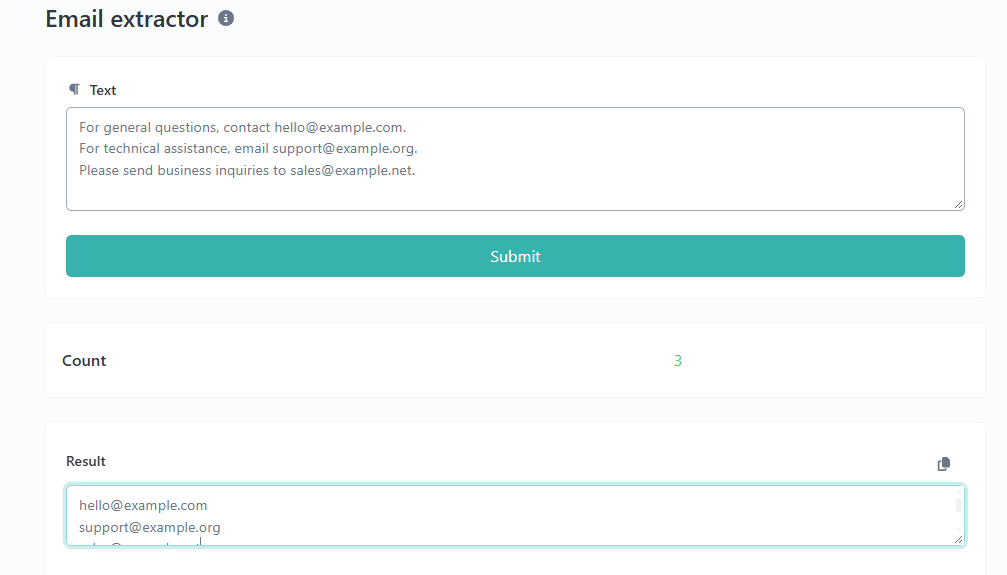
For example, consider this sample text:
For general questions, contact hello@example.com.

For technical assistance, email support@example.org.

Please send business inquiries to sales@example.net.
An Email Extractor can identify these three email addresses and present them separately, depending on the tool's features.
Email extraction identifies possible email addresses based on their format. It does not automatically prove that an address exists, accepts messages, or belongs to a particular person.
How to Use the Email Extractor on URLShorta
Follow these steps to extract email addresses from text.
Step 1: Open the Email Extractor
Visit the Email Extractor tool on URLShorta:
https://urlshorta.com/tools/email-extractor
Step 2: Enter Your Text
Copy the text you are permitted to process and paste it into the input field. The text may contain contact information, business details, or other content that includes email addresses.
Step 3: Run the Extraction
Use the extraction control provided by the tool. The tool should scan the supplied text and identify strings that match its email-address detection rules.
Step 4: Review the Results
Check the extracted addresses for spelling mistakes, duplicates, or unwanted entries. If the tool provides a copy or export feature, use it to transfer the results into your preferred application.
The available buttons and output options depend on the current implementation of the URLShorta tool.
Example: Extracting Email Addresses from Text
Suppose you have the following sample text:
Customer service: help@example.com

Sales department: sales@example.com

Technical support: helpdesk@example.org

Visit our website for more information.
The expected email-address matches are:
help@example.com

sales@example.com

helpdesk@example.org
This example demonstrates the basic purpose of email extraction: identifying email-like strings and separating them from surrounding text. These are example addresses reserved for documentation and should not be treated as real contact details.
Common Uses of an Email Extractor
1. Organizing Contact Information
Users can locate email addresses in text they are authorized to manage and arrange the results into a clearer list. This can be useful when reviewing business notes, internal documents, or supplied contact information.
2. Reviewing Website Content
Website owners and content editors may use email extraction to find contact addresses in copied page text or website documentation. This can help them review whether contact information is presented consistently.
3. Processing Text Documents
Long text files sometimes contain email addresses mixed with other information. An extractor can reduce the time spent manually searching for address-like strings.
4. Cleaning Contact Lists
After extracting addresses, users can review the list for repeated entries and formatting issues. Whether duplicates are removed automatically depends on the tool's features.
5. Supporting Data Preparation
Developers, researchers, and office workers may need to identify email addresses in text they have permission to process. An extractor can support this initial step before further manual review.
How Does Email Extraction Work?
Many email extraction tools use pattern matching, often with regular expressions, to identify strings that resemble email addresses.
A typical email address contains a local part, the @ symbol, and a domain name. For example, in help@example.com, help is the local part and example.com is the domain.
An extraction pattern looks for these components in the supplied text. Depending on the pattern, it may recognize common addresses while missing unusual but valid formats or matching strings that are not usable email addresses.
For this reason, extracted results should be treated as potential email addresses rather than a verified list of active accounts.
Email Extractor Limitations
An Email Extractor is useful for finding address-like strings, but it has important limitations.
- **It cannot guarantee deliverability:** A correctly formatted address may not exist or may reject messages.
- **It may miss unusual formats:** The detection pattern may not recognize every valid email-address format.
- **It may identify false positives:** Some strings may resemble email addresses without being usable addresses.
- **It does not establish ownership:** Finding an address does not prove who owns or controls it.
- **It may not remove duplicates:** Duplicate handling depends on the implementation.
- **It does not replace consent:** Extracting an address does not grant permission to send marketing messages.
Review results before relying on them for business or technical tasks.
Privacy and Responsible Use
Email addresses can be personal information. Only process text you have permission to use, and follow applicable privacy and data-protection requirements.
Avoid collecting addresses for unsolicited bulk messaging, spam, harassment, or other unwanted contact. If you are processing confidential documents, check the tool's privacy policy before entering sensitive information.
Do not assume that text entered into an online tool is automatically private. The handling of submitted data depends on the website's actual implementation and published privacy practices.
Email Extractor vs. Email Verification
Email extraction and email verification are different processes.
An Email Extractor identifies potential email addresses in text. An email verification service may perform additional checks to assess whether an address appears deliverable, depending on its methods and available information.
Extraction alone does not confirm that a mailbox exists, that a person owns the address, or that messages will reach the recipient. Use a separate verification process when verification is necessary and legally appropriate.
Frequently Asked Questions
What does an Email Extractor do?
It searches supplied text for strings that match email-address patterns and separates those matches from surrounding content.
Can an Email Extractor find every email address?
No. Results depend on the text, the formats present, and the extraction rules used by the tool. Some valid addresses may be missed, and some matches may be invalid.
Does extracting an email address confirm that it is active?
No. Extraction identifies a possible address based on its format. It does not confirm that the mailbox exists or can receive messages.
Can I extract multiple email addresses at once?
Many extractors support multiple matches in a block of text. The number of addresses and the available output features depend on the specific tool.
Will the tool automatically remove duplicate addresses?
That depends on the implementation. Review the output or use a separate deduplication method if unique addresses are required.
Is an Email Extractor useful for website owners?
Yes. It can help website owners review contact information in text and organize addresses they are authorized to process. It should not be used to collect addresses for spam or unwanted bulk messaging.
Conclusion
An Email Extractor can simplify the process of locating email addresses in text and preparing them for review. It is useful for organizing authorized contact information, processing documents, and identifying email-like strings without manually examining every line.
For the best results, review the extracted addresses, understand the tool's limitations, and handle personal information responsibly.
Visit the URLShorta Email Extractor to try the tool:
https://urlshorta.com/tools/email-extractor
Categories
Popular posts
-
What Is a Gravatar Checker?Checker-tools • 90 views
-
-
-
-