HTTP Headers Lookup: Check Website Response Headers Online
Created on 17 September, 2026 • Checker-tools • 61 views • 8 minutes read
When you visit a website, your browser and the website's server exchange information before the page is displayed. Some of this information is carried in HTTP headers. These headers help describe the request and response, including the content type, caching rules, server behavior, and certain security-related settings.An HTTP Headers Lookup tool helps users inspect the headers returned by a website. It can be useful for website owners, developers, SEO professionals, and anyone troubleshooting website behavior.
The URLShorta HTTP Headers Lookup tool is designed to make HTTP response information easier to examine. The exact headers displayed depend on the requested URL, the server's response, redirects, and the tool's implementation.
What Is an HTTP Header?
An HTTP header is a field that carries additional information in an HTTP request or response. Headers consist of a field name and a value, such as `Content-Type: text/html`.
Request headers are sent by a client, such as a web browser, to a server. Response headers are sent by a server back to the client. They help the client understand how to handle the response and whether particular behaviors should be applied.
For example, a server might return a `Content-Type` header to identify the format of the response or a `Cache-Control` header to describe caching instructions.
What Is an HTTP Headers Lookup Tool?
An HTTP Headers Lookup tool lets you inspect HTTP headers associated with a website or URL. Depending on the implementation, it may send an HTTP request and display response headers returned by the server.
These results can help answer questions such as:
- What content type did the server return?
- Did the response include caching instructions?
- Was the request redirected to another URL?
- Were security-related headers included in the response?
- What HTTP status code did the server return?
The tool's output reflects the response it receives. Results may differ depending on the URL, request method, network location, and server configuration.
How to Use the URLShorta HTTP Headers Lookup Tool
Step 1: Open the Tool
Visit the HTTP Headers Lookup page on URLShorta:
https://urlshorta.com/tools/http-headers-lookup
Confirm that this address matches the published tool page on your website.
Step 2: Enter a Website URL
Enter the website address you want to inspect, following the input format accepted by the tool. For example, you could use `https://example.com/`.
Use a URL you are authorized to inspect. If the tool accepts only domain names or requires a specific URL format, follow the instructions displayed on the page.
Step 3: Run the Lookup
Select the lookup button provided by the tool. The tool should request or retrieve the HTTP response information using its implemented method.
If the request fails, check the URL, connection, and any error message returned by the tool. Some websites block automated requests or behave differently depending on the requesting client.
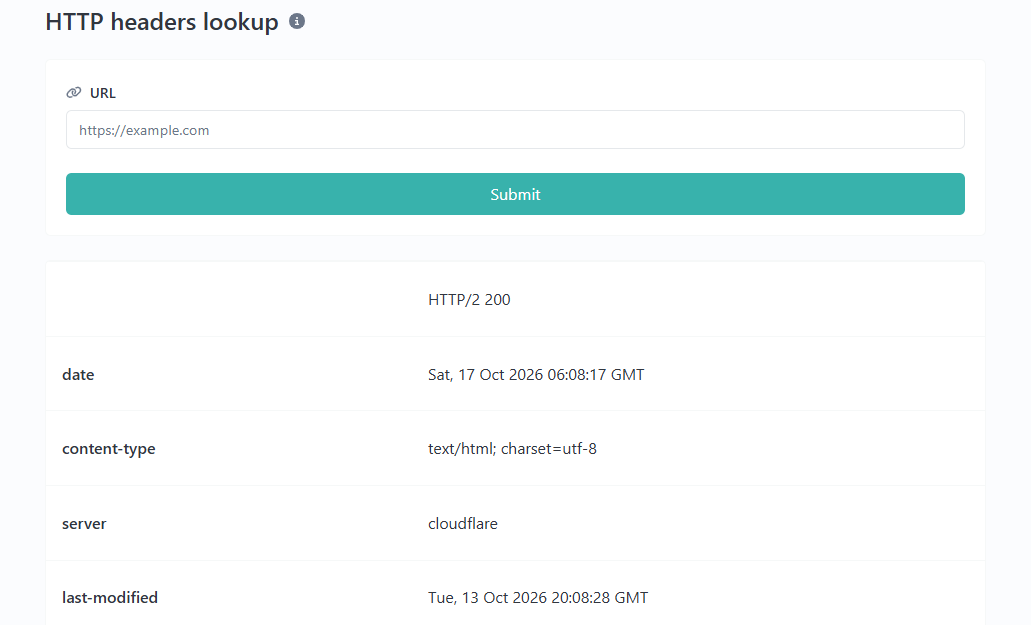
Step 4: Review the Results
Review the HTTP status code and any headers shown in the output. Pay particular attention to content type, caching instructions, redirect information, and security-related fields when they are available.
Step 5: Investigate Unexpected Results
If a header is missing or a response differs from what you expected, compare the results with the website's server configuration and browser developer tools. A single lookup may not show every response a real visitor could receive.
Common HTTP Response Headers Explained
1. Content-Type
The `Content-Type` header identifies the media type of the response body. For example:
Content-Type: text/html; charset=UTF-8
This example indicates that the response contains HTML text encoded using UTF-8.
Other common media types include `application/json` for JSON data and `text/plain` for plain text. The appropriate value depends on the content being returned.
2. Cache-Control
The `Cache-Control` header provides instructions about caching responses.
For example:
Cache-Control: max-age=3600
This directive allows a cache to consider the response fresh for up to 3,600 seconds, subject to the applicable HTTP caching rules.
A different response might include:
Cache-Control: no-store
This tells caches not to store the response. The right caching policy depends on the type of content, privacy requirements, and website behavior.
3. Strict-Transport-Security
The `Strict-Transport-Security` header, commonly called HSTS, tells supporting browsers to use HTTPS for future requests to a domain for a specified period.
Example:
Strict-Transport-Security: max-age=31536000
This example specifies a policy duration of 31,536,000 seconds. HSTS should be configured carefully because an incorrect setup may affect access to a website.
4. Content-Security-Policy
The `Content-Security-Policy` header can help reduce certain content-injection risks by defining which sources a browser may load or execute content from.
For example:
Content-Security-Policy: default-src 'self'
This is a simplified policy example, not a universal configuration recommendation. Real websites may require carefully planned rules for scripts, styles, images, fonts, and other resources.
5. X-Content-Type-Options
The following header instructs supporting browsers not to perform certain MIME-type sniffing behaviors:
X-Content-Type-Options: nosniff
It is commonly used as part of a website's security configuration. Its effectiveness depends on the content being served and the browser's handling of the response.
6. Referrer-Policy
The `Referrer-Policy` header controls how much referrer information browsers include when making subsequent requests.
For example:
Referrer-Policy: strict-origin-when-cross-origin
This policy generally limits cross-origin referrer information to the origin while preserving more information for same-origin requests, subject to the policy's rules.
7. Location
The `Location` header can identify the destination of a redirect response. For example, a server may return a redirect status code with a `Location` value pointing to another URL.
Whether the lookup tool displays the original response, follows redirects, or displays the final response depends on its implementation.
What Is an HTTP Status Code?
An HTTP status code indicates the result of a request. Although status codes are not headers themselves, they are often displayed alongside response headers.
Common examples include:
- **200 OK:** The request succeeded.
- **301 Moved Permanently:** The resource has a permanent redirect.
- **302 Found:** The resource is temporarily redirected under the applicable HTTP rules.
- **403 Forbidden:** The server refuses to fulfill the request.
- **404 Not Found:** The requested resource could not be found.
- **500 Internal Server Error:** The server encountered an unexpected condition.
The meaning of a response depends on the complete request and response context. For example, a 403 response does not necessarily mean that the entire website is unavailable.
Why Are HTTP Headers Important?
Website Troubleshooting
Headers can help developers investigate redirects, unexpected content types, caching problems, and server responses.
Performance and Caching
Caching headers influence how browsers and intermediary caches store and reuse resources. Correct caching can reduce repeated requests, while inappropriate caching may cause outdated content or privacy problems.
Security Configuration
Security-related headers can help browsers apply additional protections. However, their presence alone does not prove that a website is secure, and missing headers do not automatically mean that a website has been compromised.
SEO Diagnostics
HTTP response codes and redirects can help website owners investigate crawling and indexing issues. For example, an unexpected redirect or a persistent server error may affect how search engines access a page.
An HTTP Headers Lookup tool does not, by itself, guarantee higher rankings or complete an SEO audit.
Why Might an HTTP Headers Lookup Fail?
Invalid URL
The entered URL may be incomplete, misspelled, or unsupported by the tool. Check the address and follow the input requirements shown on the page.
Server Restrictions
A website may block automated requests, require authentication, or apply rate limits. A lookup tool may therefore receive a different response from a normal browser.
Redirects
A website may redirect HTTP traffic to HTTPS or send visitors to another hostname. The headers visible in the results depend on whether the tool follows redirects.
Network or Timeout Errors
Temporary network issues or a slow server may prevent the tool from receiving a response. Try again later or compare the result with another diagnostic method.
Missing Headers
Not every server returns every possible header. Some headers are optional, while others may be applied only to certain routes, response types, or requests.
HTTP Headers Lookup Limitations
The results from an online lookup are a snapshot of the response received by that tool. They may not exactly match what every visitor sees.
Servers can return different headers based on cookies, authentication, geographic location, request method, user agent, or CDN behavior. A tool may also display only response headers rather than request headers.
For a complete investigation, compare the lookup results with browser developer tools, server logs, and the relevant configuration. Avoid assuming that one successful response proves the website works correctly in every situation.
Frequently Asked Questions
What does an HTTP Headers Lookup tool do?
It helps inspect HTTP response headers associated with a website or URL. Depending on the tool, it may also display status codes and redirect information.
Can HTTP headers affect website security?
Yes. Some headers help browsers apply security policies, but their presence does not guarantee that a website is secure. Proper server configuration and application security remain important.
Can I use HTTP Headers Lookup to check redirects?
It can help if the tool exposes redirect responses or follows redirects and displays the relevant results. Check how the specific tool handles redirects.
Why is a security header missing?
The server may not be configured to send it, or the header may be present only on certain responses. Whether it is needed depends on the website and its security requirements.
Does HTTP Headers Lookup improve SEO automatically?
No. The tool provides diagnostic information. Website owners must interpret the results and make appropriate changes to their server or website configuration.
Can the tool check any website?
Not necessarily. Some websites restrict automated requests, require authentication, or cannot be reached from the tool's network. Results depend on the tool's capabilities and the target server's behavior.
Conclusion
HTTP Headers Lookup is a useful diagnostic method for understanding how a website responds to HTTP requests. By reviewing response headers, status codes, redirects, caching instructions, and security-related settings, website owners and developers can investigate common website issues more effectively.
Use the results as a starting point for troubleshooting rather than as a complete security or SEO assessment. For accurate conclusions, consider the request context and verify important findings against the website's actual configuration.
Visit the URLShorta HTTP Headers Lookup tool to inspect the response information available for your URL:
https://urlshorta.com/tools/http-headers-lookup
Categories
Popular posts
-
What Is a Gravatar Checker?Checker-tools • 90 views
-
-
-
-