What Is Ping?
Created on 17 September, 2026 • Checker-tools • 57 views • 4 minutes read
Ping is a simple but powerful network diagnostic tool used to test whether a device, server, or website can be reached over a network. It can also measure how long it takes for data to travel between your device and the destination.For beginners, understanding Ping can help explain internet connection problems, website accessibility, network performance, and response times.
What Is Ping?
Ping is a network utility that sends a small data request to a destination and waits for a response. The response time is commonly measured in milliseconds (ms).
A Ping test can help determine whether a destination is reachable and how quickly it responds to network requests.
How Does Ping Work?
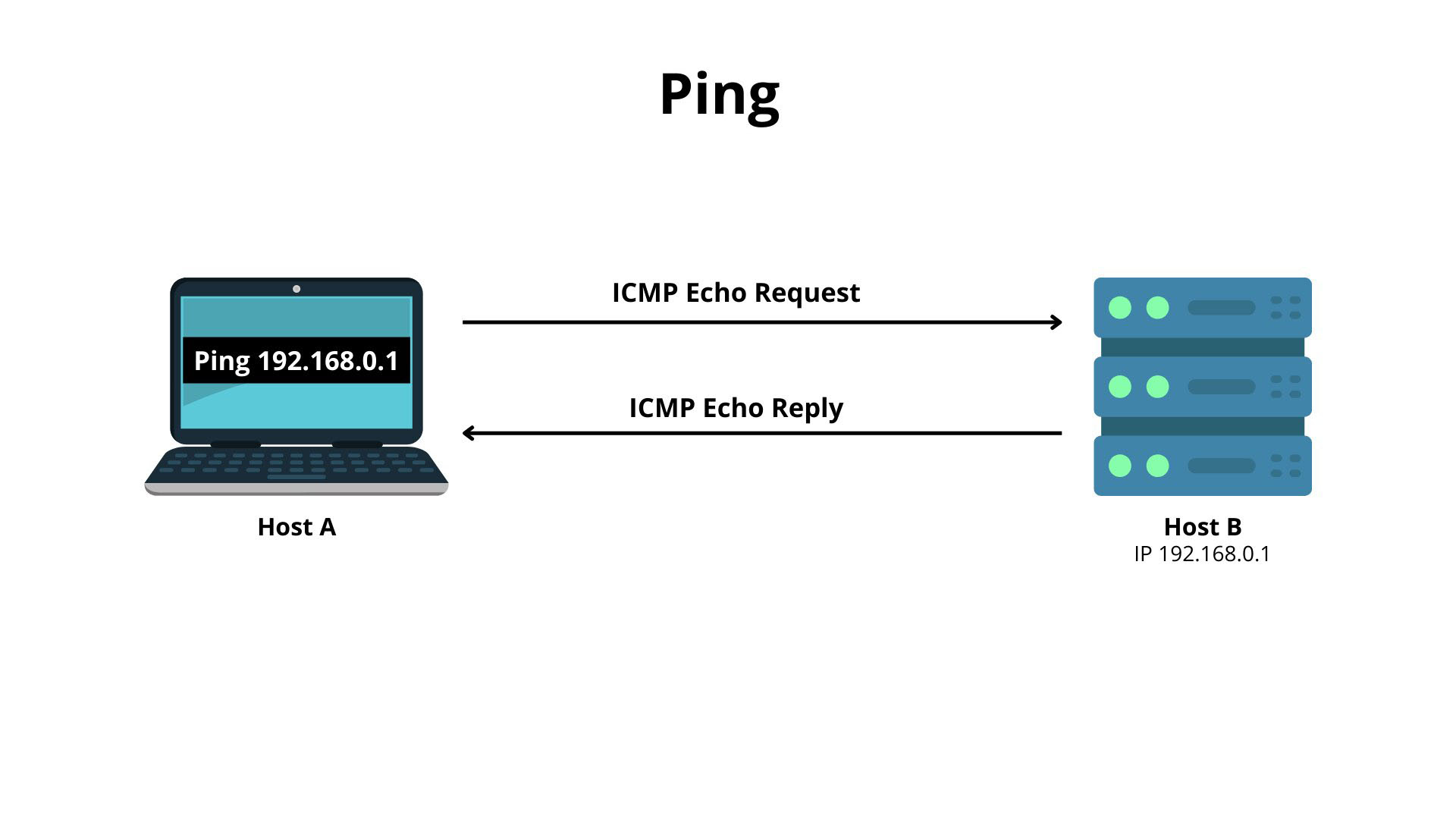
Ping typically uses Internet Control Message Protocol (ICMP) Echo Request and Echo Reply messages. Your device sends an Echo Request to the target, and if the target responds, your device measures the time between sending the request and receiving the reply.
Sending a Ping Request
The Ping tool sends an ICMP Echo Request to the target IP address or hostname.
Receiving a Response
If the destination and network allow the request, the target responds with an ICMP Echo Reply.
Measuring Response Time
The Ping utility calculates the round-trip time between your device and the destination. A shorter response time generally means less network delay between the two endpoints.
What Does Ping Measure?
Ping provides several useful pieces of network information.
Latency
Latency is the time required for data to travel between two points. Ping commonly displays round-trip latency in milliseconds.
Packet Loss
Packet loss occurs when some network packets fail to reach their destination or their responses do not return. Packet loss can cause slow connections, interruptions, and unstable network performance.
Response Availability
A successful Ping response indicates that the destination responded to the ICMP request. However, a failed Ping does not always mean that the destination is offline because firewalls and network policies may block ICMP traffic.
Why Is Ping Important?
Ping is widely used by network administrators, developers, website owners, and everyday users.
Test Internet Connectivity
You can use Ping to determine whether your device can communicate with a particular network destination.
Troubleshoot Network Problems
Ping can help identify whether connectivity problems may be related to your local network, an internet connection, or a particular destination.
Check Server Response
Website and server administrators can use Ping to test whether a server responds to network requests.
Measure Network Latency
Ping can provide a basic measurement of network delay between your device and a destination.
How to Perform a Ping Test
Step 1: Choose a Destination
Choose a domain name or IP address that you want to test.
Step 2: Run the Ping Test
Enter the destination into a Ping tool or use the Ping command available on your operating system.
Step 3: Review the Results
Check the response time, number of packets sent and received, and any reported packet loss.
How to Understand Ping Results
Ping results can help you understand basic network performance.
Low Ping Time
A low round-trip time generally indicates relatively low network latency between your device and the destination.
High Ping Time
A high Ping time indicates greater network delay. This can be caused by distance, network congestion, routing, or other network conditions.
Request Timed Out
A timeout means that the expected response was not received within the allowed period. The destination may be unavailable, the network may have a problem, or ICMP requests may be blocked.
What Is a Good Ping Time?
There is no single Ping value that is considered good for every situation. The acceptable response time depends on the type of network activity and the distance between the endpoints.
For basic web browsing, moderate latency may not be noticeable. Online gaming, video calls, and other real-time applications generally benefit from lower latency.
Ping vs Speed Test
Ping and internet speed tests measure different aspects of a connection.
Ping
Ping primarily measures response time and can help identify latency and packet loss.
Speed Test
A speed test generally measures download speed, upload speed, latency, and sometimes additional connection characteristics.
A fast internet connection can still experience high latency, so both measurements can be useful when troubleshooting network performance.
Limitations of Ping
Ping is useful, but it does not provide a complete picture of network performance. A server may block ICMP requests while still being accessible through HTTP or HTTPS.
Ping also does not measure website loading speed, download speed, or application performance directly.
Final Thoughts on Ping
Ping is one of the simplest tools for testing network connectivity and measuring basic response time. It can help users troubleshoot connection problems, check server availability, identify latency, and understand packet loss.
Whether you are a beginner, developer, website owner, or network administrator, learning how to use Ping is a valuable first step toward understanding network performance.
Categories
Popular posts
-
What Is a Gravatar Checker?Checker-tools • 90 views
-
-
-
-