Reverse Words Tool: Reverse Word Order in Text Online
Created on 23 September, 2026 • Text tools • 38 views • 4 minutes read
The Reverse Words Tool helps you rearrange the order of words in a sentence, phrase, or block of text. Instead of manually moving each word, you can enter your text and reverse its word order in a few simple steps. This tool is useful for language exercises, word games, creative writing, and basic text-processing tasks.Unlike a reverse letters tool, which changes the order of individual characters, a reverse words tool rearranges complete words while keeping the letters within each word unchanged.
What Is a Reverse Words Tool?
A Reverse Words Tool is an online text utility that changes the sequence of words in a given text. For example, the sentence “Learning new skills takes time” becomes “time takes skills new Learning” when its word order is reversed.
This operation changes the positions of words rather than the characters inside them. The result may not follow normal grammar, but it can be useful for text experiments, educational activities, and simple editing tasks.
How to Use the Reverse Words Tool
You can reverse word order in a few straightforward steps.
Step 1: Enter Your Text
Open the Reverse Words Tool and type or paste the text you want to process into the input field.
Step 2: Reverse the Word Order
Use the tool's reverse function to rearrange the words. In a standard word-reversal operation, the last word moves to the first position, followed by the remaining words in reverse order.
Step 3: Review the Result
Check the output to make sure the word order is correct. Pay attention to punctuation, spaces, and line breaks, particularly when processing longer text.
Step 4: Copy Your Reversed Text
When you are satisfied with the result, copy the output and use it in your document, educational activity, or other project.
Practical Examples of Reversing Words
These examples demonstrate how reversing word order works.
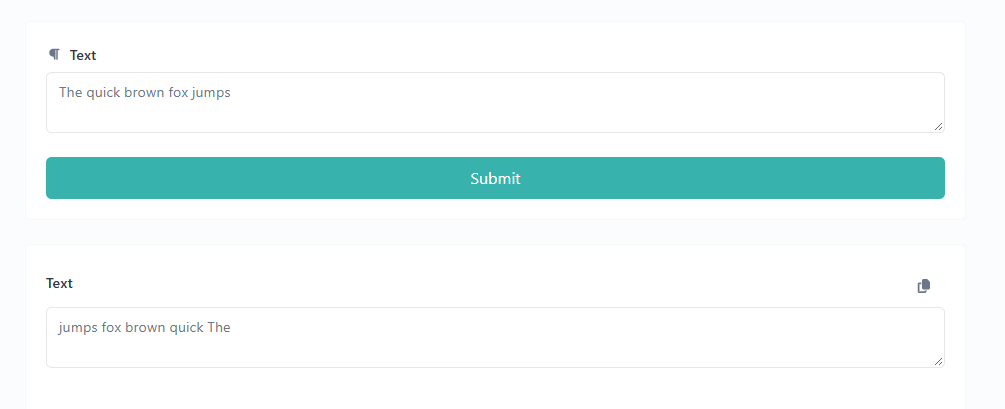
Example 1: Reversing a Simple Sentence
Original text:
The quick brown fox jumps
Reversed text:
jumps fox brown quick The
The words appear in reverse order, but the spelling of each word remains unchanged.
Example 2: Reversing a Longer Phrase
Original text:
Online tools make everyday tasks easier
Reversed text:
easier tasks everyday make tools Online
This example shows how a complete phrase can be rearranged without manually moving each word.
Example 3: Reversing a List of Words
Original list:
Apple, Banana, Orange, Mango
Reversed order:
Mango, Orange, Banana, Apple
The sequence is reversed from the last word to the first. The exact handling of commas and other punctuation depends on how the tool processes the input.
Common Uses of a Reverse Words Tool
Language Learning and Practice
Students can use reversed sentences to explore word order and sentence structure. Comparing the original sentence with the reversed version can help illustrate how word positions influence readability and meaning.
Creative Writing and Text Experiments
Writers can rearrange word sequences to create unusual phrases, experiment with text layouts, or develop creative writing exercises.
Programming and Text Processing
Developers can use reversed word sequences to test string-processing operations. For more advanced requirements, custom scripts may provide additional control over punctuation, whitespace, and special characters.
Word Games and Educational Activities
Teachers and puzzle creators can prepare simple word-order challenges. Participants can attempt to reconstruct the original phrase from its reversed version.
Reverse Words vs. Reverse Letters
Although these operations sound similar, they produce different results.
Reverse Words Example
Original: Hello World
Result: World Hello
Reverse Letters Example
Original: Hello World
Result: dlroW olleH
Reverse Words changes the positions of complete words. Reverse Letters changes the order of individual characters. Choose the appropriate tool according to your task.
Important Things to Know Before Using the Tool
Reversing word order does not automatically preserve the original sentence's grammar or meaning. The output may sound unnatural because the original sequence has changed.
Punctuation and whitespace may also affect the result. If your text contains several sentences, multiple lines, or special characters, review the output before using it elsewhere.
For privacy, avoid entering passwords, confidential documents, or sensitive personal information into an online tool unless you understand how the service processes and stores submitted data.
Frequently Asked Questions
What does a Reverse Words Tool do?
It rearranges the order of words in a text, typically placing the last word first and the first word last.
Does it reverse the letters inside each word?
No. A standard Reverse Words operation rearranges complete words. A Reverse Letters tool changes the order of individual characters.
Can I reverse a complete sentence?
Yes. Enter your sentence into the tool and use its reverse function. Review punctuation and spacing after processing.
Is reversed text always grammatically correct?
No. Reversing word order changes sentence structure, so the result may not follow standard grammar.
Can I use reversed words for educational activities?
Yes. Reversed text can be used for language exercises, word-order puzzles, and creative classroom activities.
Conclusion
A Reverse Words Tool provides a convenient way to rearrange words without manually editing their positions. It can help with language exercises, word games, creative writing, and basic text-processing tasks.
For the best results, compare the output with your original text and check punctuation and formatting before using it in another document.
Try the Reverse Words Tool on Urlshorta to rearrange your text and explore how word order changes a sentence.
Categories
Popular posts
-
What Is a Gravatar Checker?Checker-tools • 90 views
-
-
-
-