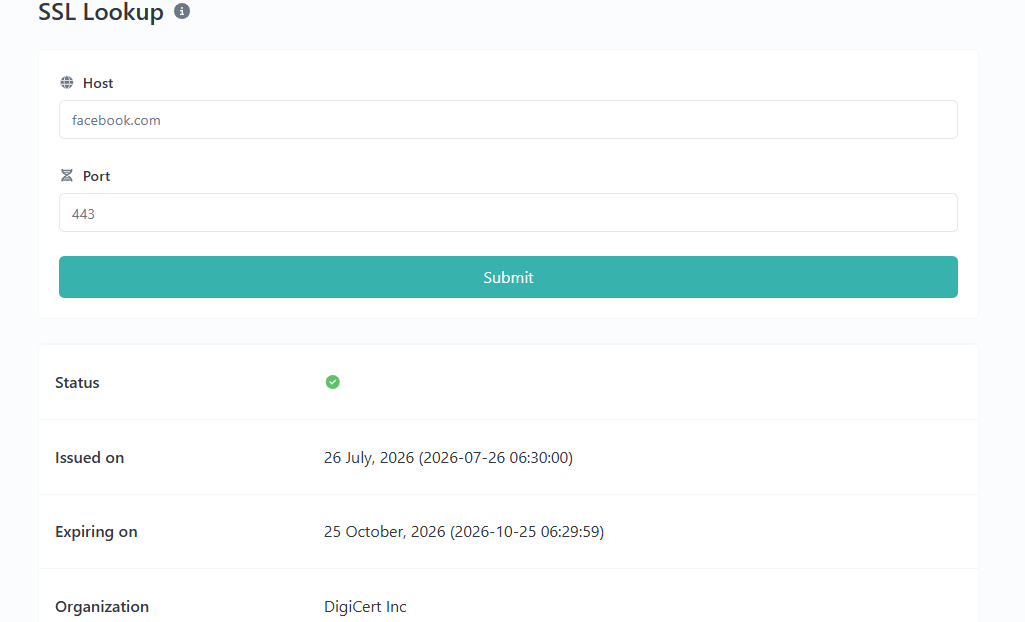
SSL Lookup – Check SSL Certificates Online
Created on 17 September, 2026 • Checker-tools • 48 views • 7 minutes read
When you visit a website, your browser may display a padlock icon or indicate that the connection is secure. One technology behind this connection is Transport Layer Security (TLS), commonly associated with the older term Secure Sockets Layer (SSL).An SSL Lookup tool helps users inspect certificate information for a domain. Depending on the tool's capabilities, it may show details such as the certificate issuer, validity period, subject name, and other certificate properties.
The URLShorta SSL Lookup tool is intended to make certificate information easier to inspect. The information available depends on the tool's implementation and the certificate data it can retrieve.
What Is SSL Lookup?
SSL Lookup is a process of checking the TLS certificate associated with a website or domain. Although people still commonly say SSL certificate, modern websites generally use TLS, which replaced the older SSL protocols.
A TLS certificate helps a browser verify the identity of a website and establish an encrypted connection when the certificate and connection are properly configured.
For example, a website using HTTPS presents a certificate during the connection process. A browser checks several properties, including whether the certificate is trusted, valid for the requested hostname, and within its validity period.
An SSL Lookup tool can help administrators and website owners review certificate information without manually examining every certificate detail.
Why Should You Check an SSL Certificate?
Checking a certificate can help identify configuration problems and understand a website's HTTPS setup.
1. Review Certificate Expiration
Certificates have a validity period. If a certificate expires and is not renewed, browsers may display a security warning or refuse to establish a normal trusted connection.
Checking the expiration date can help website administrators plan renewals before a certificate becomes invalid.
2. Identify the Certificate Issuer
A certificate issuer is the certificate authority or other issuer identified in the certificate. Reviewing this information can help administrators understand which authority issued the certificate.
The issuer name alone does not guarantee that a website is safe. Trust depends on the certificate chain, hostname, validity, and other checks.
3. Check the Domain Name
A certificate must be valid for the hostname being visited. If the hostname does not match the certificate's covered names, a browser may show a certificate warning.
Checking the subject name and Subject Alternative Name (SAN) entries can help identify which domain names the certificate covers.
4. Troubleshoot HTTPS Problems
Certificate information can help investigate problems such as expired certificates, hostname mismatches, or an unexpected certificate being presented by a server.
An SSL Lookup result is one part of troubleshooting. Server configuration, DNS settings, network intermediaries, and the certificate chain may also need to be checked.
How to Use the URLShorta SSL Lookup Tool
Step 1: Open the SSL Lookup Page
Visit the SSL Lookup tool on URLShorta:
https://urlshorta.com/tools/ssl-lookup
Make sure this address matches the published SSL Lookup page on your website.
Step 2: Enter a Domain Name
Enter the hostname you want to inspect, such as example.com. Follow the input format required by the tool. If the tool accepts domain names only, do not include a full URL or a path.
Step 3: Start the Lookup
Use the lookup button provided on the page. The tool should retrieve or inspect certificate information using its implemented lookup method.
If no result appears, check the hostname, the tool's error message, and whether the service is available.
Step 4: Review the Certificate Details
Read the fields displayed by the tool. Depending on its features, these may include the certificate issuer, subject, covered hostnames, validity dates, or other certificate information.
Not every SSL Lookup tool provides all of these fields.
Step 5: Investigate Any Warnings
If the result indicates an expired certificate, a hostname mismatch, or another problem, investigate the relevant server configuration. Do not assume that a certificate is fully valid or that a website is safe based on a single field.
Understanding Common SSL Certificate Fields
Subject
The subject identifies the entity named in the certificate. For website certificates, the exact hostname coverage is commonly determined by the Subject Alternative Name extension rather than relying on the subject field alone.
Subject Alternative Name (SAN)
SAN entries list the DNS names or other identifiers covered by a certificate. A certificate may cover one hostname or several hostnames, depending on how it was issued.
Issuer
The issuer field identifies the authority or entity that issued the certificate. To evaluate trust, the full certificate chain and the client's trusted certificate store also matter.
Valid From and Valid To
These fields indicate the beginning and end of the certificate's validity period. A certificate outside this period may fail normal browser validation.
Public Key Information
Certificates contain public-key information used as part of cryptographic authentication. The security of a connection also depends on the algorithms, protocol configuration, private-key protection, and other factors.
Certificate Fingerprint
A certificate fingerprint is a hash calculated from certificate data. It can help compare certificates or identify a specific certificate, but a matching fingerprint alone does not establish that a website is trustworthy.
What Is the Difference Between SSL and HTTPS?
SSL is the older name commonly used when discussing website certificates. TLS is the modern protocol used to secure most HTTPS connections.
HTTPS means HTTP communication protected by TLS. A certificate is part of the authentication process, but the presence of a certificate alone does not mean that a website's content is honest, legitimate, or free from scams.
A phishing website can also use HTTPS. Always consider the domain name and the purpose of the website, not just whether the connection is encrypted.
Common SSL Certificate Problems
Expired Certificate
An expired certificate may cause browsers to display a security warning. The website administrator should review the certificate renewal process and confirm that the server presents the renewed certificate.
Hostname Mismatch
A hostname mismatch occurs when the certificate does not cover the domain being visited. The administrator should check the requested hostname and the certificate's SAN entries.
Incomplete Certificate Chain
A server may fail to provide the intermediate certificates required to build a trusted certificate chain. The server configuration may need to be updated with the correct chain.
Untrusted Certificate
A browser may reject a certificate if it cannot establish trust in the issuing chain or if another validation problem exists. The correct diagnosis depends on the exact browser error and certificate configuration.
Unexpected Certificate
A server may present a different certificate than expected because of virtual-host configuration, a proxy, a CDN, or another network component. Compare the hostname and connection path before deciding where the problem originates.
Does a Valid SSL Certificate Mean a Website Is Safe?
No. A valid certificate helps authenticate the hostname and protect the connection, but it does not verify that a website's business, content, or claims are trustworthy.
Before entering sensitive information, check the domain spelling, look for signs of phishing, and make sure the website is the service you intended to visit. Never rely on the padlock icon as the only sign of legitimacy.
SSL Lookup Limitations
SSL Lookup results depend on the method used to retrieve certificate data. Some tools inspect a certificate presented by a live server, while others retrieve certificate information from an external database.
These approaches may produce different results. A database result may not reflect a recent server configuration change, and a single certificate check may not cover every hostname, network path, or client environment.
A lookup also does not replace a complete security audit, vulnerability assessment, or review of the website's application code.
Frequently Asked Questions
What does an SSL Lookup tool do?
It helps inspect TLS certificate information associated with a domain. The exact fields and checks depend on the tool's implementation.
Is SSL still used today?
SSL is an older protocol name that remains common in everyday terminology. Modern HTTPS connections generally use TLS rather than the obsolete SSL protocols.
Can SSL Lookup tell me when a certificate expires?
It can if the tool retrieves certificate validity dates and displays them. Check the actual result fields provided by the tool.
Can a website have HTTPS and still be a scam?
Yes. HTTPS helps protect data in transit and supports hostname authentication, but it does not guarantee that a website's content or operator is trustworthy.
Why might an SSL Lookup return no result?
Possible causes include an invalid hostname, a connection failure, unavailable certificate data, an unsupported input format, or a problem with the lookup service.
Does an SSL Lookup scan a website for malware?
Not necessarily. Certificate inspection and malware scanning are different tasks. Do not assume the tool checks for malware unless that capability is explicitly implemented.
Conclusion
SSL Lookup can help website owners and developers understand certificate information, check validity dates, review covered hostnames, and investigate common HTTPS problems.
For accurate results, examine the certificate details alongside the browser's security information and the server's configuration. Remember that a valid certificate protects the connection but does not guarantee that the website itself is legitimate.
Visit the URLShorta SSL Lookup tool to inspect the certificate information available for your domain:
https://urlshorta.com/tools/ssl-lookup
Categories
Popular posts
-
What Is a Gravatar Checker?Checker-tools • 90 views
-
-
-
-