URL Decoder: Decode Encoded URLs into Readable Text
Created on 6 October, 2026 • Converter Tools • 44 views • 7 minutes read
A URL Decoder is an online tool that converts percent-encoded characters in a URL into their decoded representation. Encoded URLs are commonly used on websites, in web applications, search queries, and API requests. Although encoding helps special characters travel safely through different systems, it can make a URL difficult to read.For example, the encoded text `%20` represents a space character in percent-encoding. Similarly, `%3F` represents a question mark, and `%26` represents an ampersand. A URL Decoder helps you recognize these characters and understand the information contained in an encoded URL.
The URL Decoder tool on URLShorta provides a convenient way to decode supported URL-encoded text online. It can help developers, website owners, students, and everyday users inspect URLs without manually replacing each encoded character.
What Is URL Decoding?
URL decoding is the process of converting percent-encoded sequences into their corresponding characters. In percent-encoding, a percent sign followed by two hexadecimal digits represents a byte value.
For example, `%20` represents a space, `%3D` represents an equals sign, and `%2F` represents a forward slash.
Consider this encoded text:
`name%3DAlice%26city%3DYangon`
After decoding, the result is:
`name=Alice&city=Yangon`
The decoded output is easier to read because the encoded equals sign and ampersand have been converted back into their corresponding characters.
URL decoding is especially useful when a URL contains encoded query parameters, search terms, or other text that needs to be inspected.
How to Use the URLShorta URL Decoder
Step 1: Open the URL Decoder Tool
Visit the URLShorta URL Decoder page to access the decoding tool.
Step 2: Copy Your Encoded URL
Copy the URL or encoded text you want to inspect. The input might come from a browser address bar, a website link, an application log, or an API response.
For example:
`https%3A%2F%2Fexample.com%2Fprofile%3Fname%3DAlice%26city%3DYangon`
Step 3: Paste the Encoded Text
Paste the copied value into the tool's input field. Check that you have copied the complete string and have not accidentally removed any percent signs or hexadecimal characters.
Step 4: Decode the URL
Use the tool's decode function to convert the supported encoded characters. The exact result depends on the input format and the decoder's supported behavior.
Step 5: Review the Decoded Result
For the example above, the decoded result should be:
`https://example.com/profile?name=Alice&city=Yangon`
Review the result before using it. Decoding changes the representation of encoded characters, but it does not verify that a website is safe or that the resulting URL exists.
URL Decoding Examples
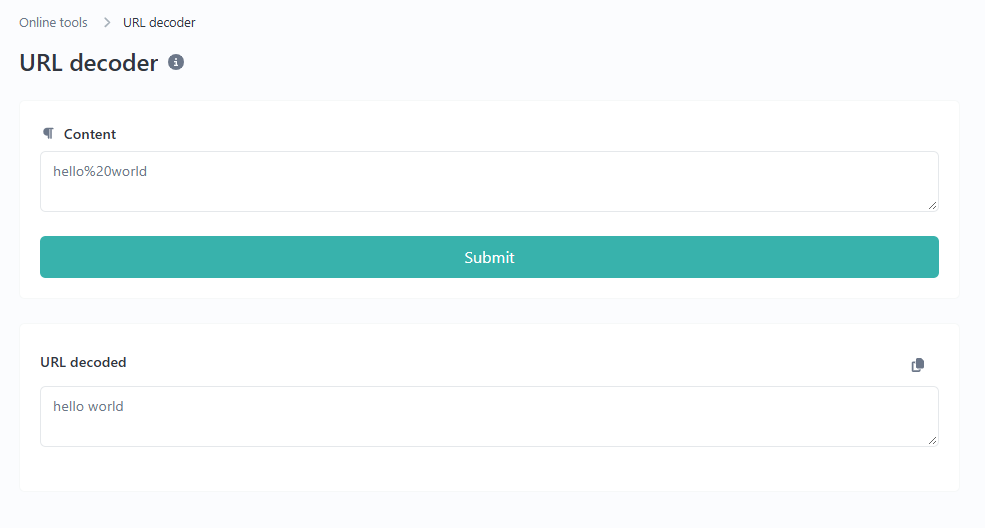
Example 1: Decode a Space Character
Encoded text:
`hello%20world`
Decoded text:
`hello world`
The sequence `%20` represents a space character. This encoding commonly appears in URL query values that contain multiple words.
Example 2: Decode Special Characters
Encoded text:
`price%3D25%26currency%3DUSD`
Decoded text:
`price=25¤cy=USD`
In this example, `%3D` becomes `=` and `%26` becomes `&`. The decoded output makes the two query-style values easier to understand.
Example 3: Decode an Encoded URL
Encoded URL:
`https%3A%2F%2Fexample.com%2Fsearch%3Fq%3Dhello%2520world`
Decoded URL after one decoding pass:
`https://example.com/search?q=hello%20world`
Notice that `%2520` becomes `%20` after one decoding pass. This happens because `%25` represents the percent sign. The remaining `%20` is still encoded.
This example demonstrates why decoding should be performed carefully. Some URLs contain multiple layers of encoding, and decoding every layer automatically can change the meaning of the data.
Common Uses of a URL Decoder
Understanding URL Query Parameters
Websites often include information after a question mark in a URL. These query parameters can contain search terms, filters, identifiers, or other values. Decoding the encoded characters can make the information easier to inspect.
For example, a search term containing encoded spaces or special characters may become more readable after decoding.
Web Development and Debugging
Developers may inspect encoded URLs when testing websites, debugging redirects, examining application logs, or troubleshooting requests. Decoding can help identify the intended characters in a URL.
However, decoding alone does not reveal every issue in a web request. Server behavior, request methods, headers, and application logic may also affect the result.
Reading Shared Links
Long or encoded links can be difficult to understand when copied from messages, websites, or applications. A URL Decoder can make supported encoded sections easier to read before you decide whether to open or share the link.
Learning About URL Encoding
Students and beginners can use URL decoding examples to understand how websites represent spaces and special characters. Comparing encoded input with decoded output is a practical way to learn how percent-encoding works.
Important URL Decoding Rules
Percent-Encoding Is Not Encryption
URL encoding is not a security method. It changes the representation of characters but does not keep the information secret. Anyone who can read the encoded value may be able to decode it.
Do not treat an encoded URL as private or secure simply because it contains percent signs and hexadecimal characters.
Do Not Decode Every URL Repeatedly
Some URLs contain encoded data inside another encoded value. Repeatedly decoding the same text may convert characters that were intentionally encoded for a later processing step.
For example, `%2520` becomes `%20` after one pass. A second pass converts `%20` into a space. The correct number of decoding passes depends on how the original data was created and how it is meant to be processed.
Plus Signs May Have Different Meanings
In some form-encoded query strings, a plus sign (`+`) represents a space. In other URL contexts, a plus sign can be a literal plus character.
The behavior depends on the encoding format and decoding method. If the distinction matters, check the source format rather than assuming every plus sign represents a space.
Common URL Decoding Problems
Invalid Percent-Encoding
A percent-encoded sequence normally contains a percent sign followed by two hexadecimal digits. For example, `%20` is valid, while `%2G` is not a valid percent-encoded byte because `G` is not a hexadecimal digit.
If decoding fails, check the input for incomplete or incorrectly copied sequences.
Unexpected Decoded Characters
A decoded result may contain characters that look unfamiliar or may not display as expected. This can happen when the original data uses a different character encoding or when the input is incomplete.
Compare the result with the original source and confirm the expected format.
The Decoded URL Does Not Open
A URL can be decoded correctly and still fail to load. The domain may not exist, the page may have moved, or the server may reject the request. URL decoding changes encoded characters; it does not repair websites or guarantee a working destination.
URL Decoder vs. URL Encoder
A URL Encoder converts characters into a percent-encoded representation when needed for use in a URL. A URL Decoder reverses that process by converting supported encoded sequences back into their corresponding characters.
Use a URL Encoder when preparing text or URL components for a suitable URL context. Use a URL Decoder when you need to inspect an already encoded value.
You can also try the URLShorta URL Encoder to encode supported text online.
Frequently Asked Questions
What does a URL Decoder do?
A URL Decoder converts percent-encoded sequences, such as `%20` and `%3F`, into their corresponding characters. This makes supported encoded URL text easier to read and inspect.
Can I decode a URL without installing software?
Yes. You can use an online decoder through a compatible web browser. Visit the URLShorta URL Decoder to try the available tool.
Does URL decoding make a link safe?
No. Decoding only changes the representation of encoded characters. It does not scan a destination for malware, phishing, or other security risks. Review unfamiliar links carefully before opening them.
Why does a URL still contain percent signs after decoding?
The URL may contain multiple encoding layers. One decoding pass may reveal another encoded sequence. Avoid decoding repeatedly unless you understand how the value was originally encoded.
Can a decoded URL still be invalid?
Yes. A decoded URL may contain malformed components, reference a nonexistent page, or be unsuitable for its intended context. Decoding does not automatically validate or repair a URL.
Conclusion
A URL Decoder helps convert percent-encoded characters into a more readable form. It is useful for understanding query parameters, inspecting links, debugging applications, and learning how URL encoding works.
For a convenient way to decode supported URL-encoded text, visit the URLShorta URL Decoder. If you need to encode text instead, use the URL Encoder tool.
Always review the decoded result carefully, especially when a URL contains multiple encoding layers. Remember that decoding does not confirm whether a link is safe, valid, or trustworthy.
Categories
Popular posts
-
What Is a Gravatar Checker?Checker-tools • 90 views
-
-
-
-